How to Import & Set Up BlsquiSDK-Unreal in Unreal Engine 5 (Zero-Fee Web3 & Esports Payments)
Integrating blockchain assets, esports prize payouts, or direct in-game payments into Unreal Engine 5 shouldn't require writing custom cryptography or forcing players through clunky browser extensions.
In this guide, you’ll learn how to import and set up BlsquiSDK-Unreal(https://github.com/blsqui/BlsquiSDK-Unreal) inside your UE5 project in just a few minutes.
\
First, open the Unreal Engine project.
Mac: /Users/<your account>/Documents/Unreal Projects/<Your UE5 Project>
Windows: C:\Users\<your account>\Documents\Unreal Projects\<Your Project UE5>
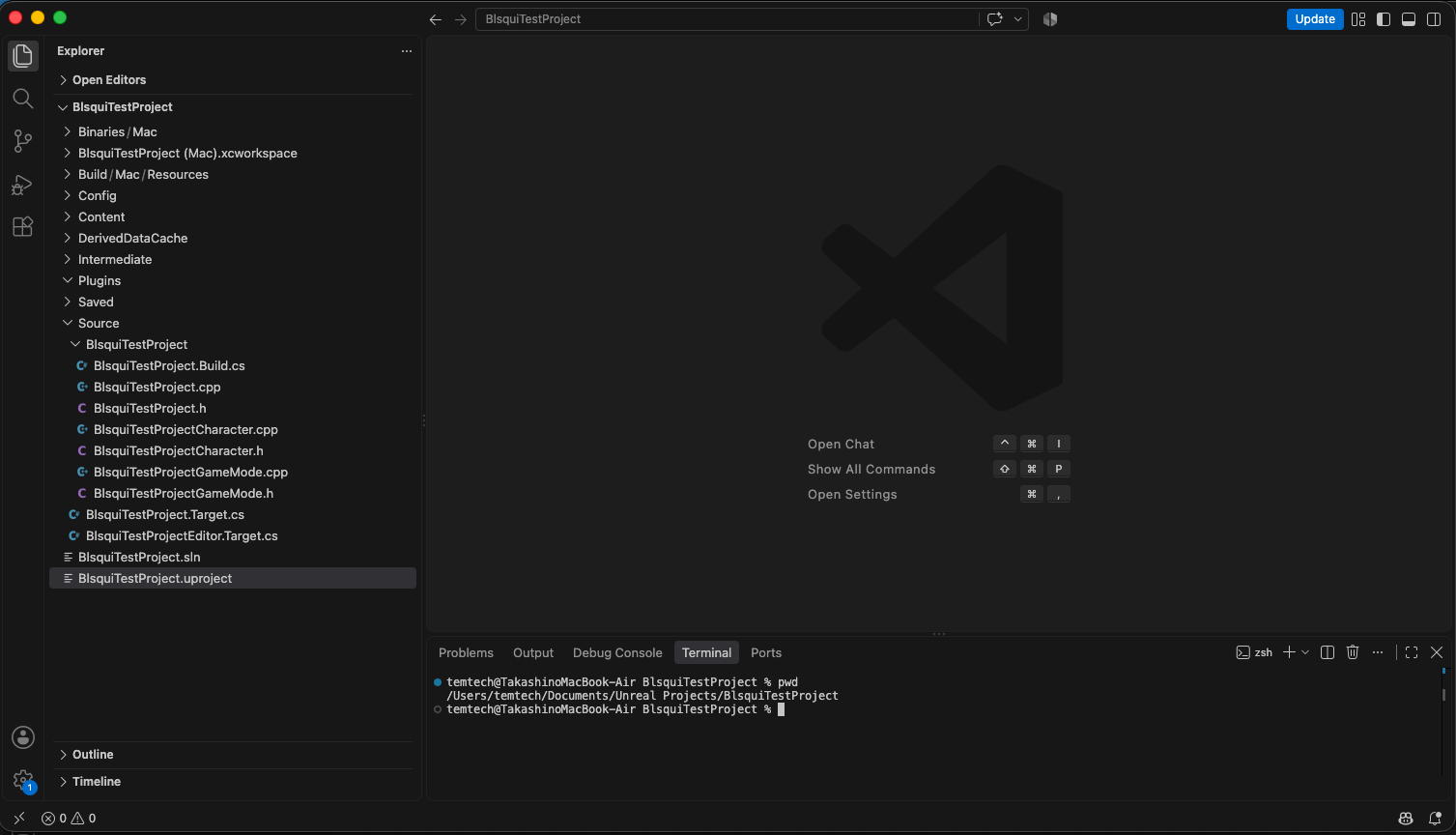
Run the following command in the project root.
git clone https://github.com/blsqui/BlsquiSDK-Unreal.git Plugins/BlsquiSDK
A BlsquiSDK directory will be created in the Plugins folder.
Next, perform a build.
Mac:
"/Users/Shared/Epic Games/UE_5.5/Engine/Build/BatchFiles/Mac/Build.sh" \
  BlsquiTestProjectEditor Mac Development \
  -Project="/Users/<your account>/Documents/Unreal Projects/<Your UE5 Project>/<Your UE5 Project>.uproject"
I am not as familiar with Windows, but it appears the process is as follows:
"C:\Program Files\Epic Games\UE_5.5\Engine\Build\BatchFiles\Build.bat" ^
  BlsquiTestProjectEditor Win64 Development ^
  -Project="C:\Users\<your account>\Documents\Unreal Projects\<Your UE5 Project>\<Your UE5 Project>.uproject"
If you run the command and the output appears as shown below, the build has been successful.
---- Starting trace ----
UbaSessionServer - Disable remote execution (remote sessions will finish current processes)
------ Building 12 action(s) started ------
[1/12] Compile [Apple] BlsquiSDKModule.cpp
[2/12] Compile [Apple] BlsquiCurrentUser.cpp
[3/12] Compile [Apple] BlsquiTestProjectGameMode.cpp
[4/12] Compile [Apple] BlsquiTestProjectCharacter.gen.cpp
[5/12] Compile [Apple] BlsquiSDKComponent.cpp
[6/12] Compile [Apple] BlsquiTestProjectCharacter.cpp
[7/12] Compile [Apple] Module.BlsquiSDK.cpp
[8/12] Compile [Apple] BlsquiStageSlot.cpp
[9/12] Compile [Apple] BlsquiWebRTCPresence.cpp
[10/12] Link [Apple] UnrealEditor-BlsquiSDK.dylib (UBA disabled)
ld: warning: building for macOS-13.0, but linking with dylib '@rpath/libdatachannel.0.dylib' which was built for newer version 26.0
[11/12] Link [Apple] UnrealEditor-BlsquiTestProject.dylib (UBA disabled)
ld: warning: building for macOS-13.0, but linking with dylib '@rpath/libdatachannel.0.dylib' which was built for newer version 26.0
[12/12] WriteMetadata BlsquiTestProjectEditor.target (UBA disabled)
Trace file written to /Users/temtech/Documents/Library/Application Support/Epic/UnrealBuildTool/Log.uba with size 4.1kb
Total time in Unreal Build Accelerator local executor: 15.74 seconds
Deploying BlsquiTestProjectEditor Mac Development...
Deploying now!
Total execution time: 20.81 seconds
Here, I will introduce the contents of the SDK code.
To ensure UE5 developers can integrate on-chain features using familiar Blueprint and C++ patterns, the SDK is cleanly separated into six core modules:
BlsquiCurrentUser(Session & Inventory State Management) Built onUGameInstanceSubsystem, this class persists the player's login state and wallet address across level transitions. It handles launching the companion dashboard (OpenDashboard), triggering in-game item actions (RequestUseItem), and dispatching real-time equipment or item-use events sent from the web dashboard.BlsquiSDKComponent(Transaction Execution & Polling Engine) AUActorComponentyou can attach directly to any PlayerController or Character. CallingRequestTransactionautomatically requests a tamper-proof signed session token, launches the browser signing gateway, polls asynchronously until on-chain finality (SEALED), and firesOnTransactionCompletedback to your game logic.BlsquiWebRTCPresence(Zero-Lag P2P DataChannel Bridge) Powered bylibdatachannel, this module establishes a direct WebRTC DataChannel between the Unreal runtime and the player's browser wallet. When a player swaps weapon slots or triggers an item from the web dashboard, the state updates in-game with sub-second, zero-lag responsiveness.BlsquiStageSlot&BlsquiTypes(Blueprint-Ready Data Structures) Defines cleanUSTRUCT(BlueprintType)payloads—such asFStageSlotItem,FItemUseRequestPayload, andFTxResult—along with dynamic multicast delegates. You can wire equipped items, remaining durability charges, and transaction results straight into UMG widgets or Blueprints without writing C++.BlsquiSDKModule(Cross-Platform Native Library Lifecycle) Handles plugin startup and shutdown across Windows and macOS, cleanly loading and releasing bundled native binaries likelibdatachannelbehind the scenes.
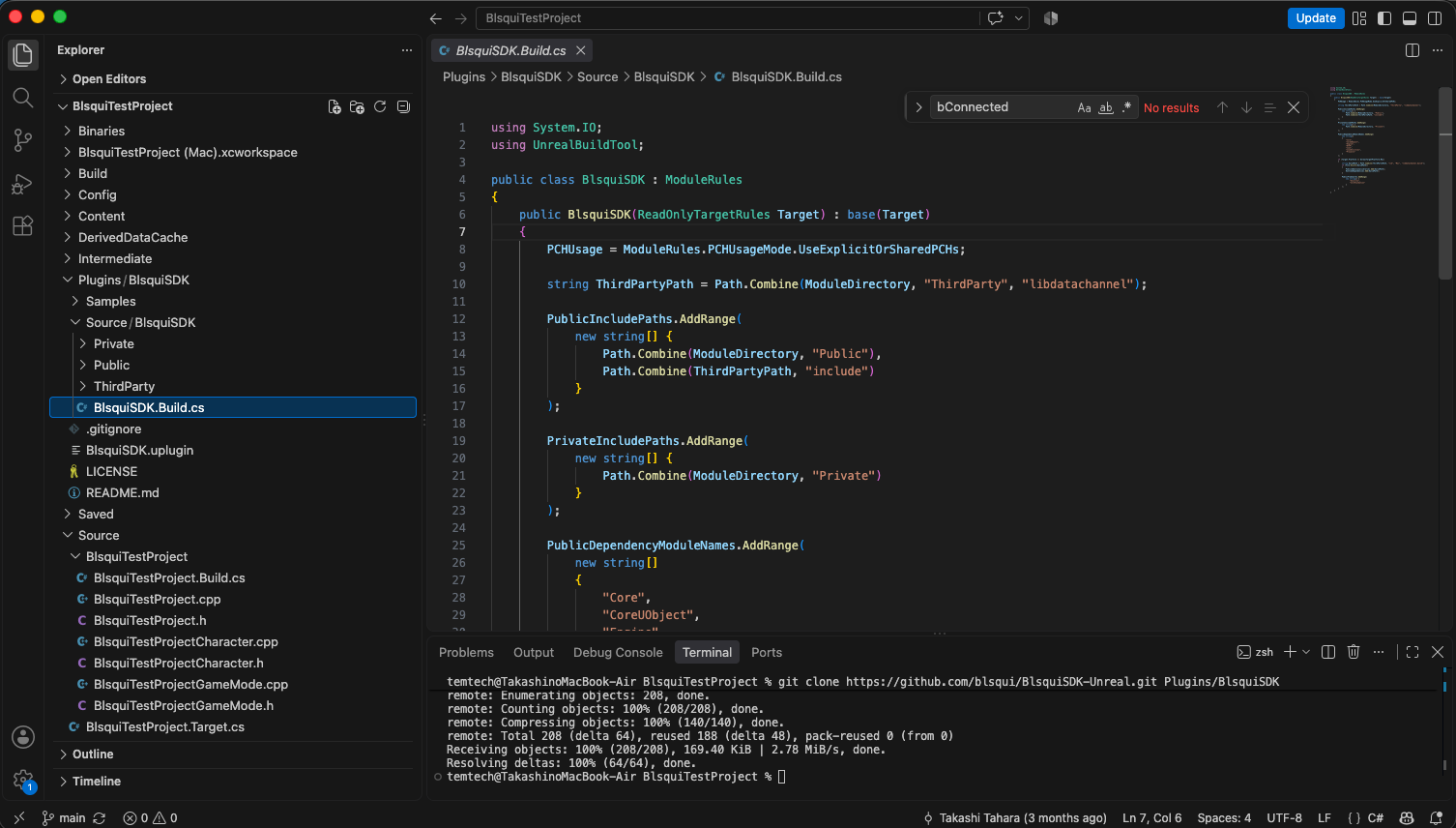
Next, integrate the BlsquiSDK into the project.
Open `Source/<Your UE5 Project>/<Your UE5 Project>.Build.cs`.
// Copyright Epic Games, Inc. All Rights Reserved.

using UnrealBuildTool;

public class BlsquiTestProject : ModuleRules
{
	public BlsquiTestProject(ReadOnlyTargetRules Target) : base(Target)
	{
		PCHUsage = PCHUsageMode.UseExplicitOrSharedPCHs;

		PublicDependencyModuleNames.AddRange(new string[] {
			"Core", "CoreUObject", "Engine", "InputCore", "EnhancedInput", "BlsquiSDK"
		});
	}
}
Add "BlsquiSDK" to PublicDependencyModuleNames.AddRange as shown here.
Now, let’s try launching your UE5 project in this state.
First, build the project.
"/Users/Shared/Epic Games/UE_5.5/Engine/Build/BatchFiles/Mac/Build.sh" \
  <Your Project UE5>Editor Mac Development \
  -Project="/Users/<your account>/Documents/Unreal Projects/<Your Project UE5>/<Your Project UE5>.uproject"
WebRTC Setup
The SDK uses the libdatachannel library for WebRTC communication.
To properly link and load the native dynamic library on macOS, run the following commands:
SRC_DYLIB="/Users/<your account>/Documents/Unreal Projects/<Your UE5 Project>/Plugins/BlsquiSDK/Source/BlsquiSDK/ThirdParty/libdatachannel/lib/Mac/libdatachannel.dylib"
PLUGIN_BIN="/Users/<your account>/Documents/Unreal Projects/<Your UE5 Project>/Plugins/BlsquiSDK/Binaries/Mac"
PROJECT_BIN="/Users/<your account>/Documents/Unreal Projects/<Your UE5 Project>/Binaries/Mac"

mkdir -p "$PLUGIN_BIN" "$PROJECT_BIN"
cp "$SRC_DYLIB" "$PLUGIN_BIN/libdatachannel.0.dylib"
cp "$SRC_DYLIB" "$PROJECT_BIN/libdatachannel.0.dylib"

install_name_tool -change "@rpath/libdatachannel.0.dylib" "@loader_path/libdatachannel.0.dylib" "$PLUGIN_BIN/UnrealEditor-BlsquiSDK.dylib"

codesign --force --sign - "$PLUGIN_BIN/libdatachannel.0.dylib"
codesign --force --sign - "$PROJECT_BIN/libdatachannel.0.dylib"
codesign --force --sign - "$PLUGIN_BIN/UnrealEditor-BlsquiSDK.dylib"
codesign --force --sign - "$PROJECT_BIN/UnrealEditor-<Your UE5 Project>.dylib"
Launch the UE5 Editor.
open "/Users/<your account>/Documents/Unreal Projects/<Your UE5 Project>/<Your UE5 Project>.uproject"
The UE5 Editor will launch as shown below.
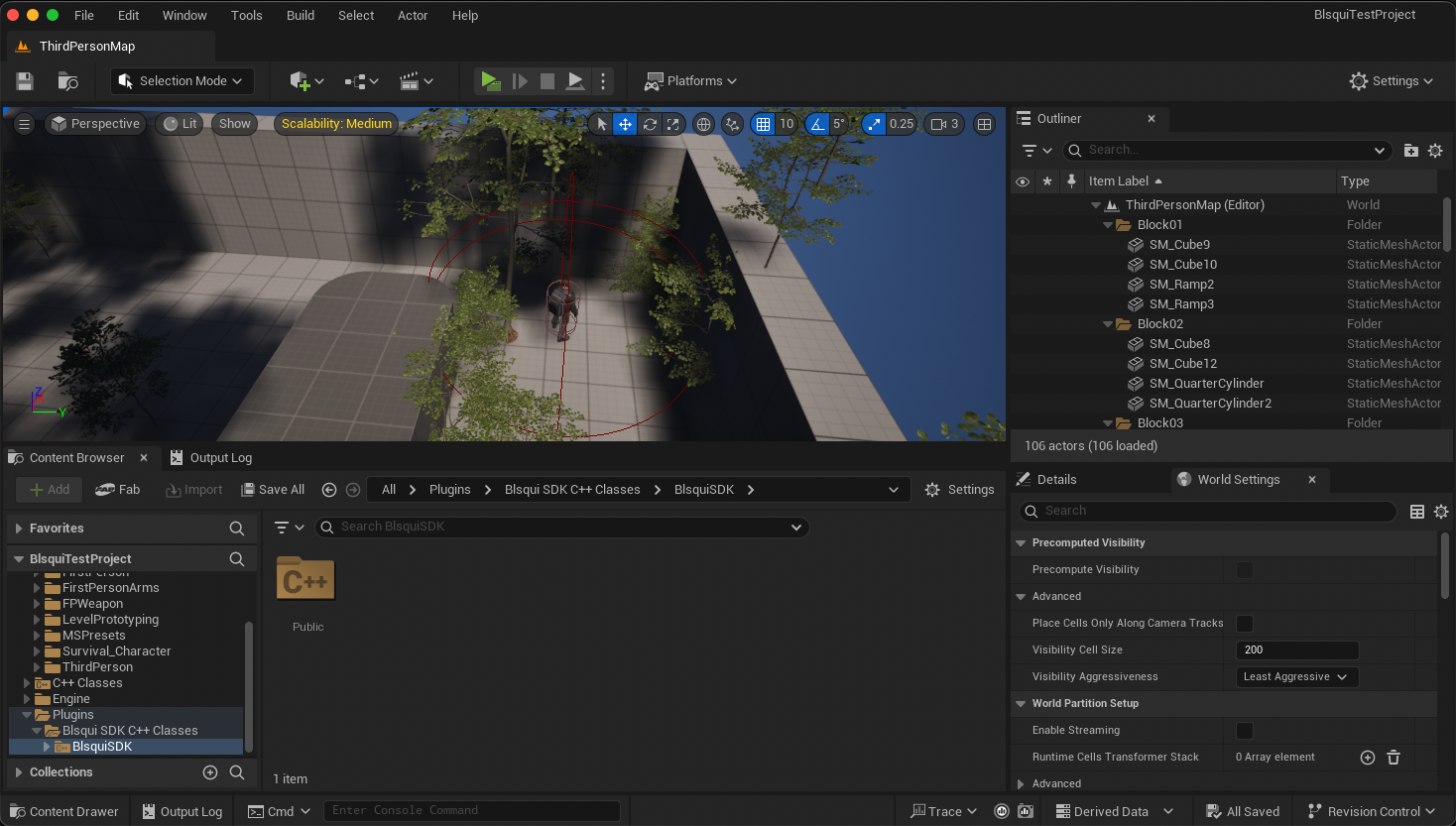
Note that this is specific to my own UE5 project, so the screen you see may look completely different.
Retrieve the state of the equipment slots (FStageSlotItem) for a specific blockchain account.
Configure the settings in the editor's Graph as follows:
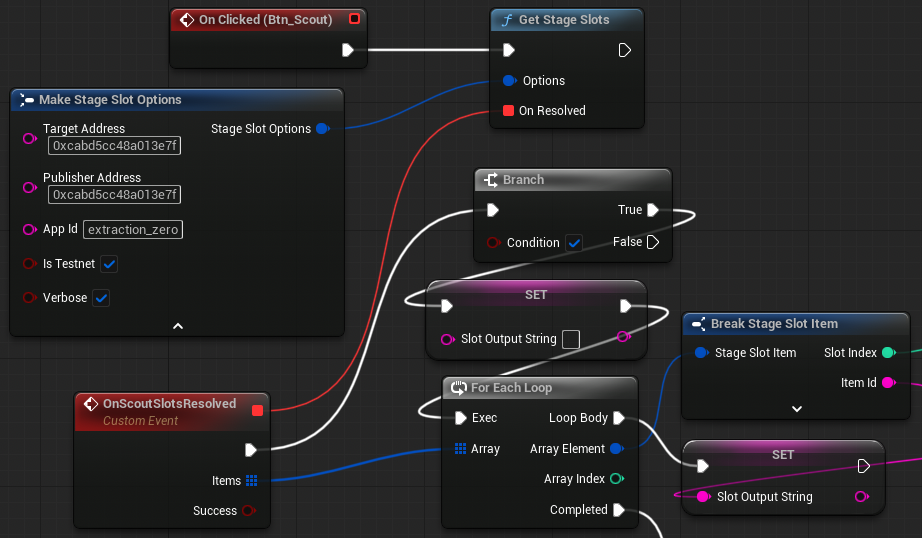
Slots are configured on a per-app basis for each publisher. Therefore, in addition to a specific blockchain address, you must also specify the publisher's address (the address used to log in to the Management Console) and the app ID.
Open the dashboard and retrieve the slot information displayed there.
Configure the settings in the editor's Graph as follows:
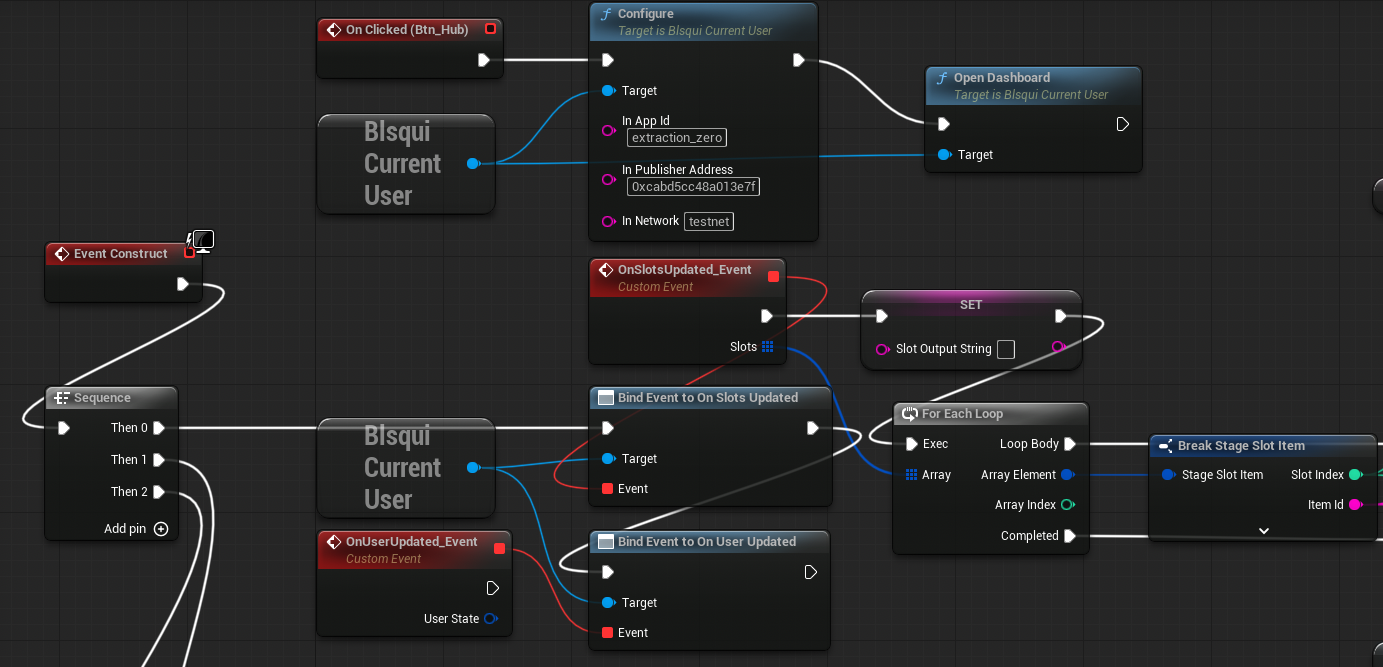
I am well aware that this is difficult to see; however, if you upload this image to an AI tool like Gemini, it will be able to tell you what steps to take. (Please include the following URL when doing so: https://github.com/blsqui/BlsquiSDK-Unreal)
Purchase items
Configure the settings in the editor's Graph as follows:
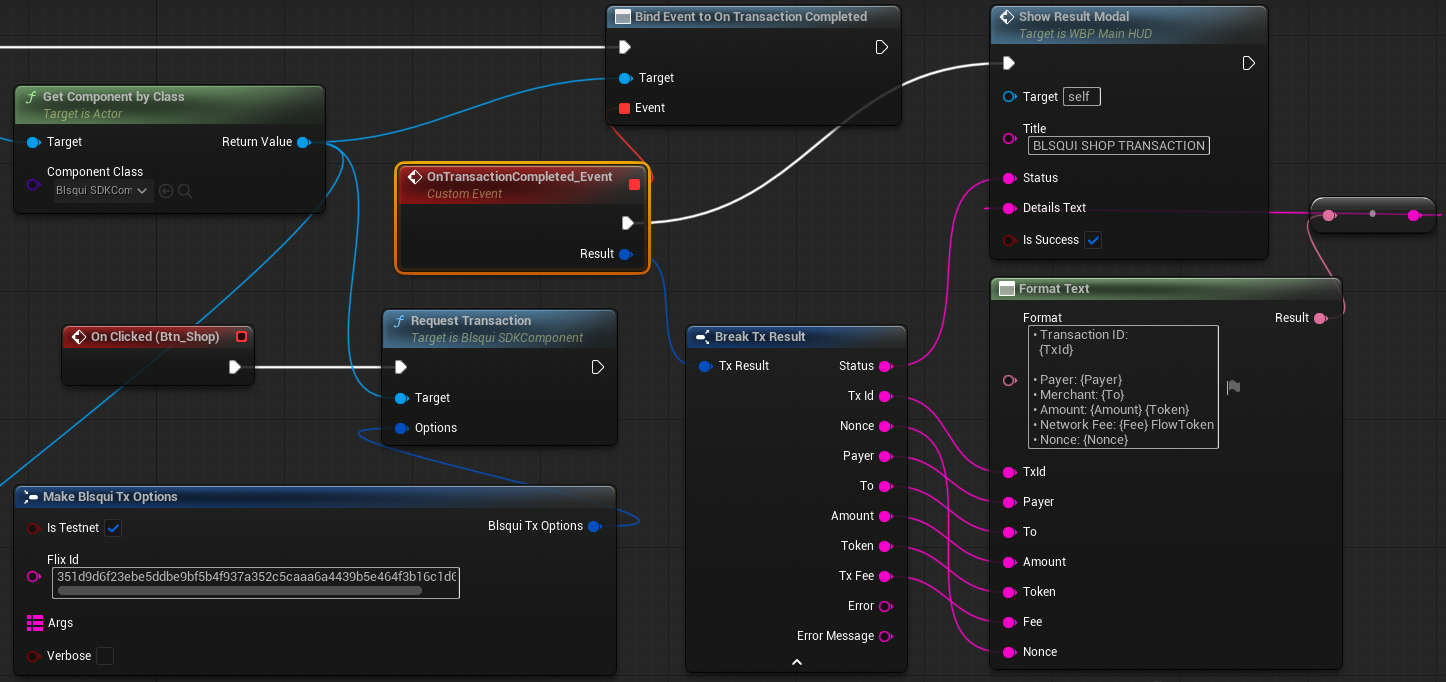
Prompting Blockchain Item Usage
Configure the settings in the editor's Graph as follows:
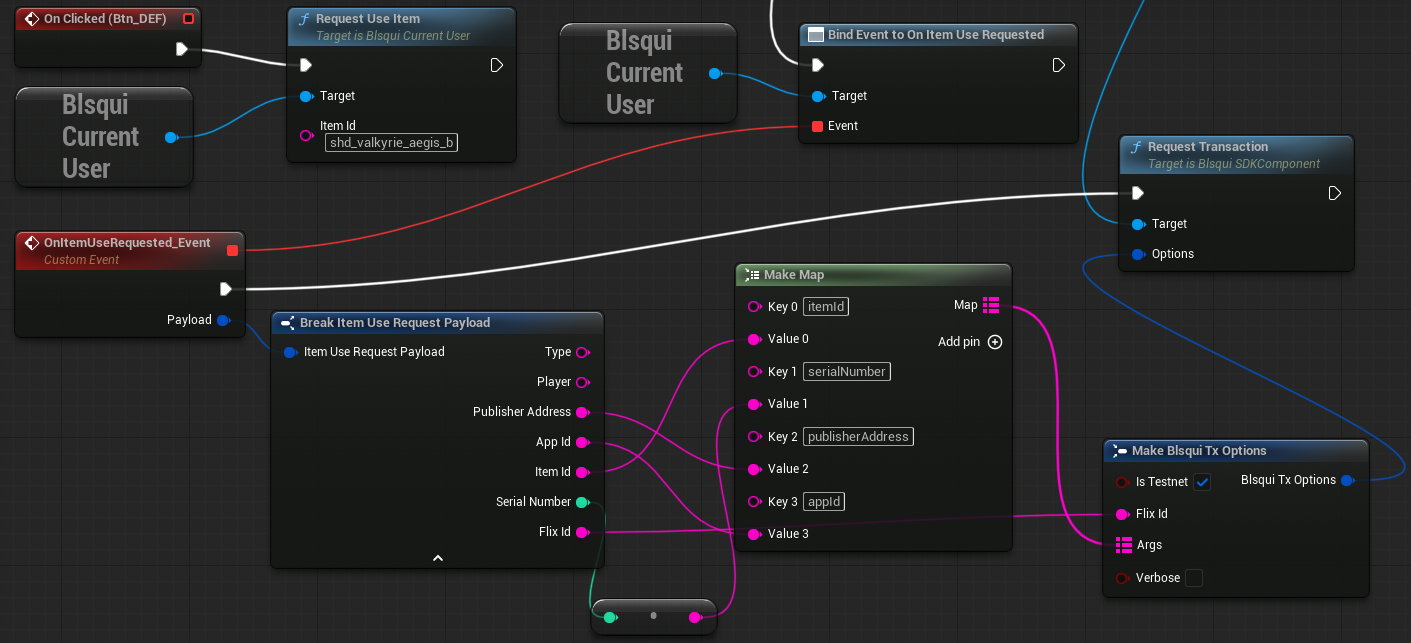
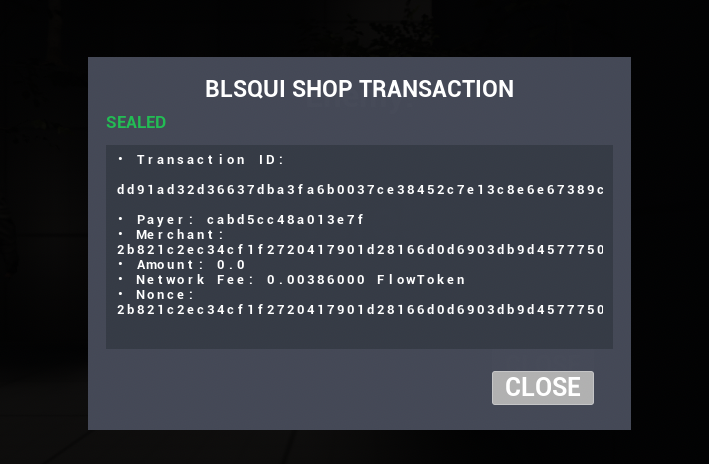
On the top left, clicking the button sends a prompt to the dashboard with the target Item Id set, urging the player to use the item. The rest of the graph handles the response when the player confirms item usage on the dashboard. By passing Publisher Address, App Id, Item Id, and Serial Number into RequestTransaction, the SDK uniquely identifies and consumes the exact item on-chain. Once finalized, the exact same completion callback (On Transaction Completed) is triggered as when purchasing an item.
Try it out!
- Set up two monitors side-by-side and access the dashboard from within the game.
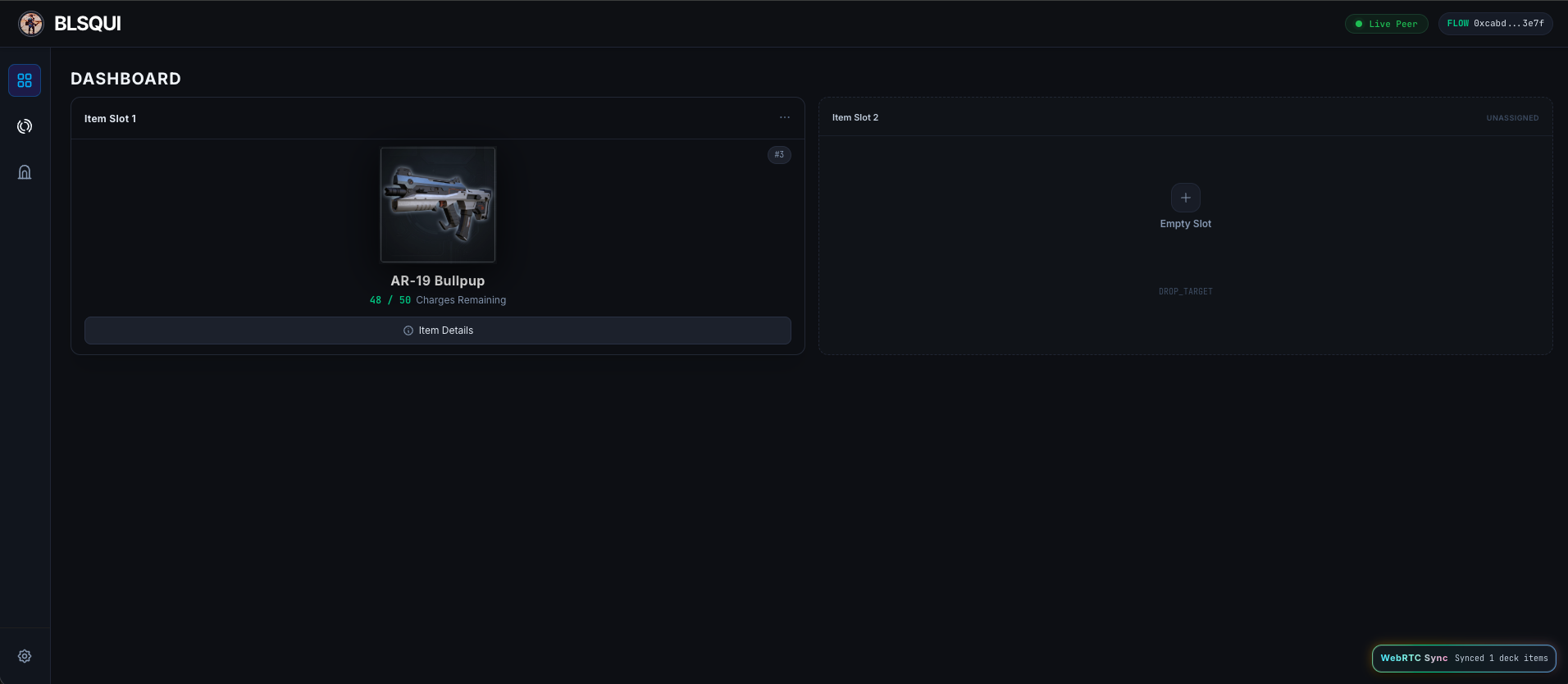
- Prompt the user to use an item when the situation calls for it.
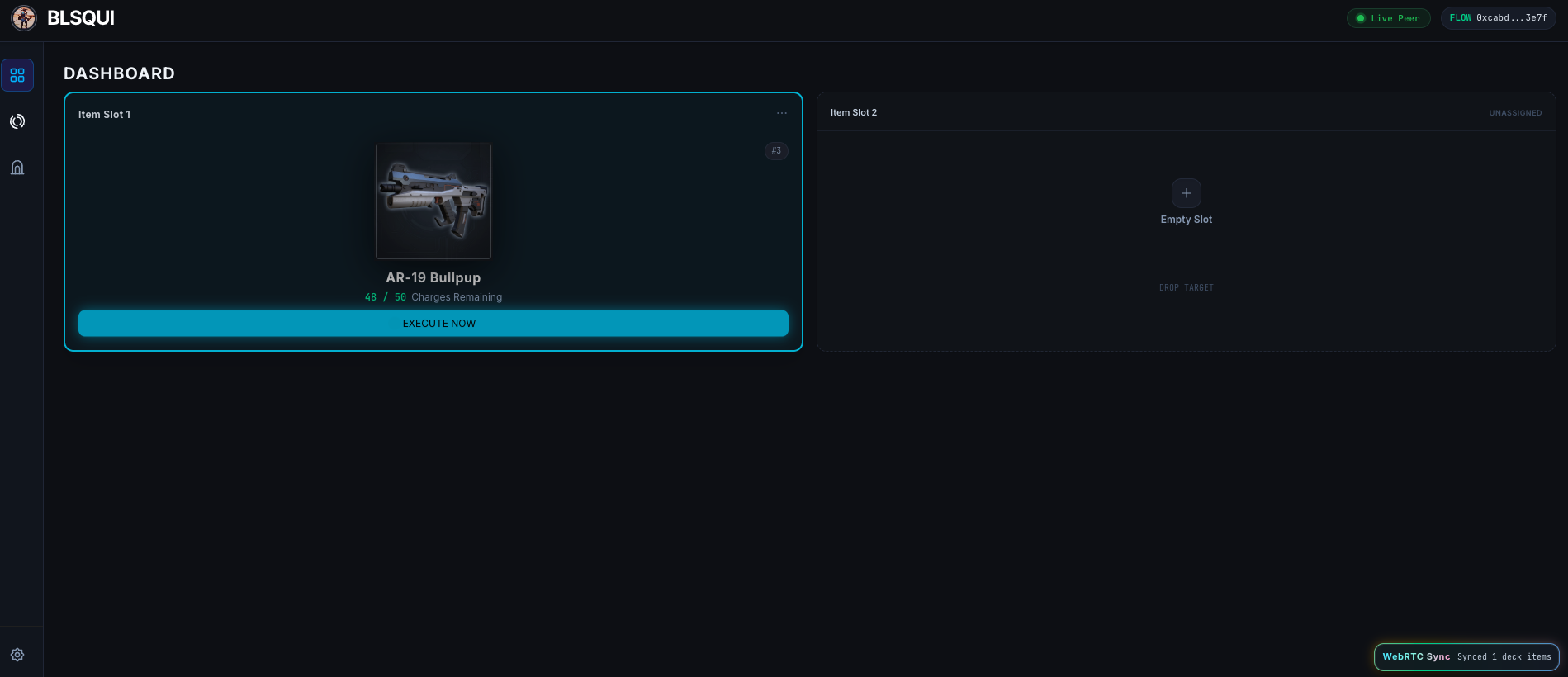
If the dashboard is already open, the specified item will light up. Pressing a button within a set timeframe sends a notification to the game.
- The transaction for using the item is executed.
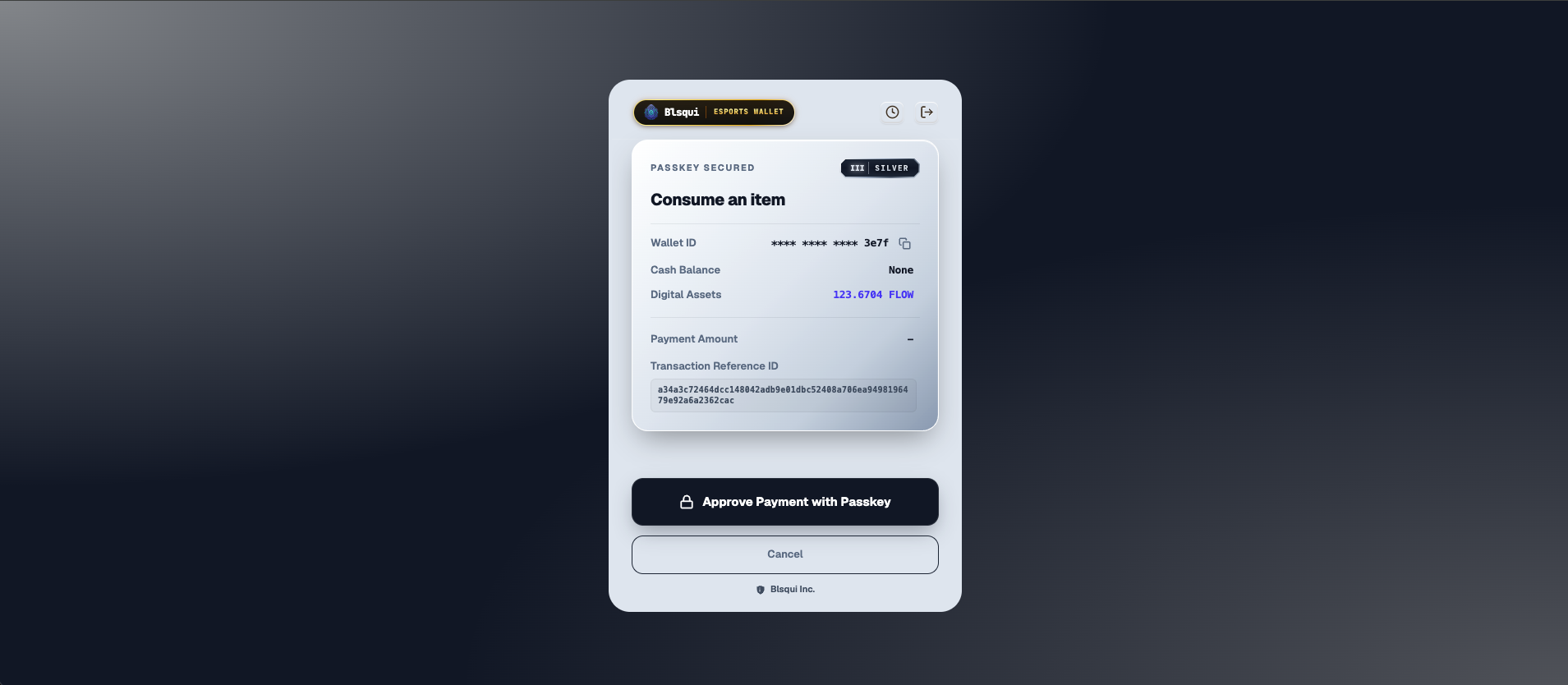
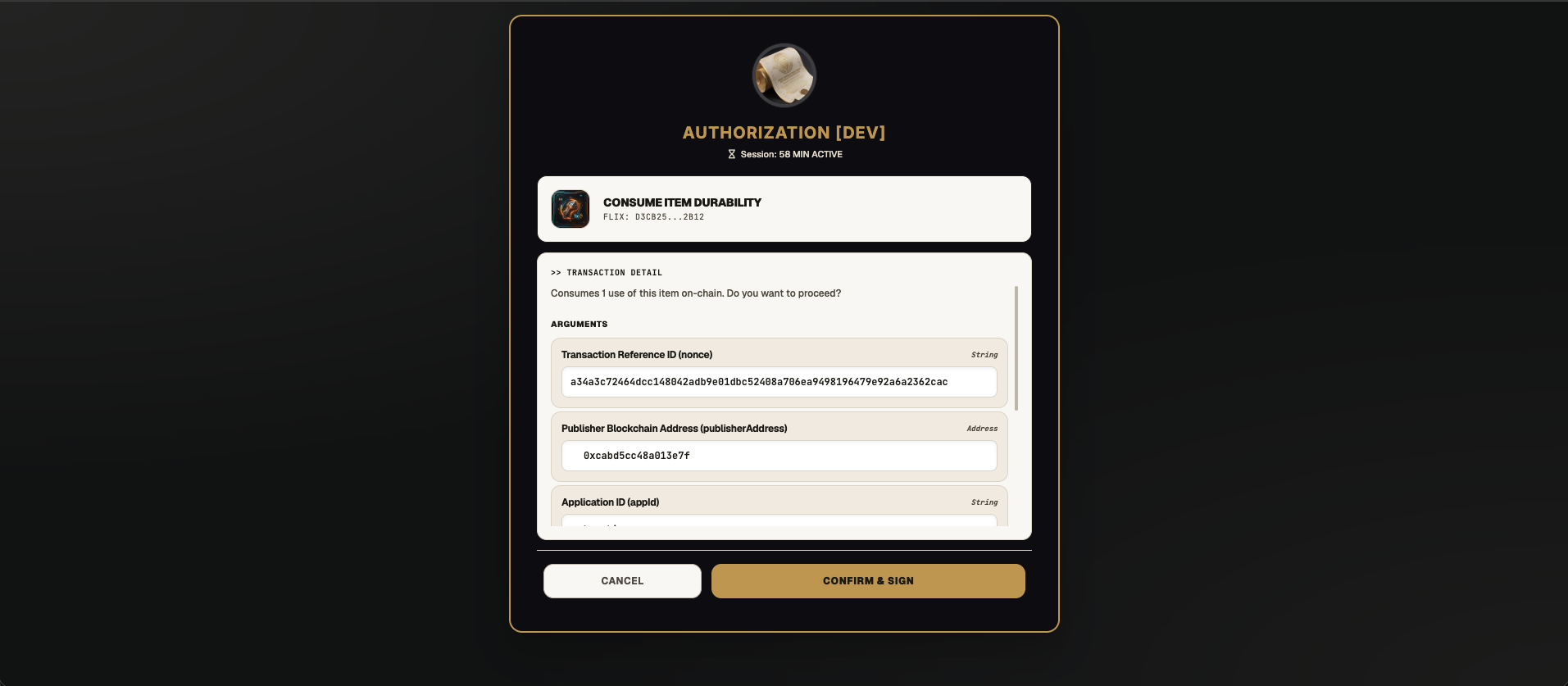
- The game receives the result of the transaction.
About the author
- Founder & Architect of Blsqui. Building the cloud-native infrastructure layer that transforms standard video games into instant Web3 eSports platforms. Passionate about democratizing global revenue networks for the next generation of independent, AI-driven creators. Creating plug-and-play, no-code backend frameworks for Unity and Godot that integrate frictionless stablecoin microtransactions without client-side execution overhead.
Comments
Join the discussionNo comments yet. Be the first to comment.